This post was written by Gaurav, a GTM intern at Nori Agentic and NYU Stern class of ’28. One of the things we try to do with Agentics is showcase how different people are using agents -- what their workflows are, how they set up automations, and what scar tissue can they pass along. Gaurav has been working with agents to do a lot of social media management. He had some thoughts on what that looks like in an agent-first era.
Fortunately, if you’re trying to learn more about the AI world, there’s a plethora of online communities you can go to and learn from people who are operating at the edge and want to share their learnings. X generally has the ai-pilled users that either make you believe the world will end tomorrow or we will cure cancer tomorrow. Substack generally has the users that are ai-rejectors and value human content. And LinkedIn … LinkedIn is a lost cause. Now, of course, it’s great that there are distinct communities you can join, but unfortunately, this also means communities are dispersed, and, if you create content like we do, then you will find it distinctly tedious syncing your work across these different platforms.
Much of the company’s work gets posted to Amol’s Substack to get more eyeballs on what we’re doing. But this also means we’re totally missing out on other communities. For example, even if we wanted to keep up with posting on X, none of us have the time to constantly monitor an X account. So we did what any logical person would do. We used cloud agents to do it for us.
Cloud agents are just coding agents that live in an isolated cloud environment, not your local machine. This is useful to have your agents run in the background, so you can delegate a task and leave. The agent continues without your laptop or terminal remaining open, then returns an artifact such as an analysis, code change, or pull request. It can be started by a person in Slack from your computer or phone, or automatically by a trigger. A huge benefit of cloud/background agents, which we will talk about here, is that they (along with their cloud environment) can be fired upon set triggers, whether they be event-reactive or time-based.
The benefit of using coding agents rather than just a deterministic pipeline for this task is that by having agents as the couriers of content and having them scrape the timelines, you avoid a lot of the judgment problems that deterministic pipelines can’t handle. In trying to account for every edge case in a brittle workflow, this project would easily be turned from a one-day thing into a multi-week project. Because the agents can exercise judgement, they do a pretty good job at handling edge cases and working around blockades without human intervention.
There are a lot of different cloud agent providers -- we use our own Nori cloud agents (for obvious reasons). If you’re looking for a cloud agent provider, try a free trial at noriagentic.com.
In this post, I want to walk you through how we use cloud agents to syndicate content. We’re going to focus on how we manage our X account, but the same principles apply everywhere.
Now, X and Substack have similar types of posts: X has regular tweets and long articles, Substack has notes and posts, respectively.
Notes and tweets
Let’s first start with notes/tweets. Amol usually posts notes directly to Substack throughout the day at the time he has a thought worth posting. So, we have a Nori cron trigger for every 3 hours, so that at time of trigger, a fresh cloud session gets spun up. This cron trigger is stored in our broker database (a control-plane database that manages Nori, including cloud runtime allocations, scheduled triggers, session resumability, etc.) Note that session Micro Virtual Machines (micro VMs) are ephemeral, so they’re released when the session ends. But the broker isn’t. Its SQLite database holds trigger definitions and run history on disk, so a schedule set today still fires next week on a machine that doesn’t exist yet.
So, at every 3rd hour, the broker claims a micro VM from a fleet and injects a stored prompt explaining that the agent was kicked off from a trigger, what it must do plus necessary steps, and that there is no human present so it must finish its task in one turn. The agent is also initialized with the following tools: nori-substack-cli (read public Substack notes and convert them into structured JSON), nori-slack-cli (access to the Slack Web API, scoped by the broker proxy to the thread that spawned the session), and nori-twitter (to access X).
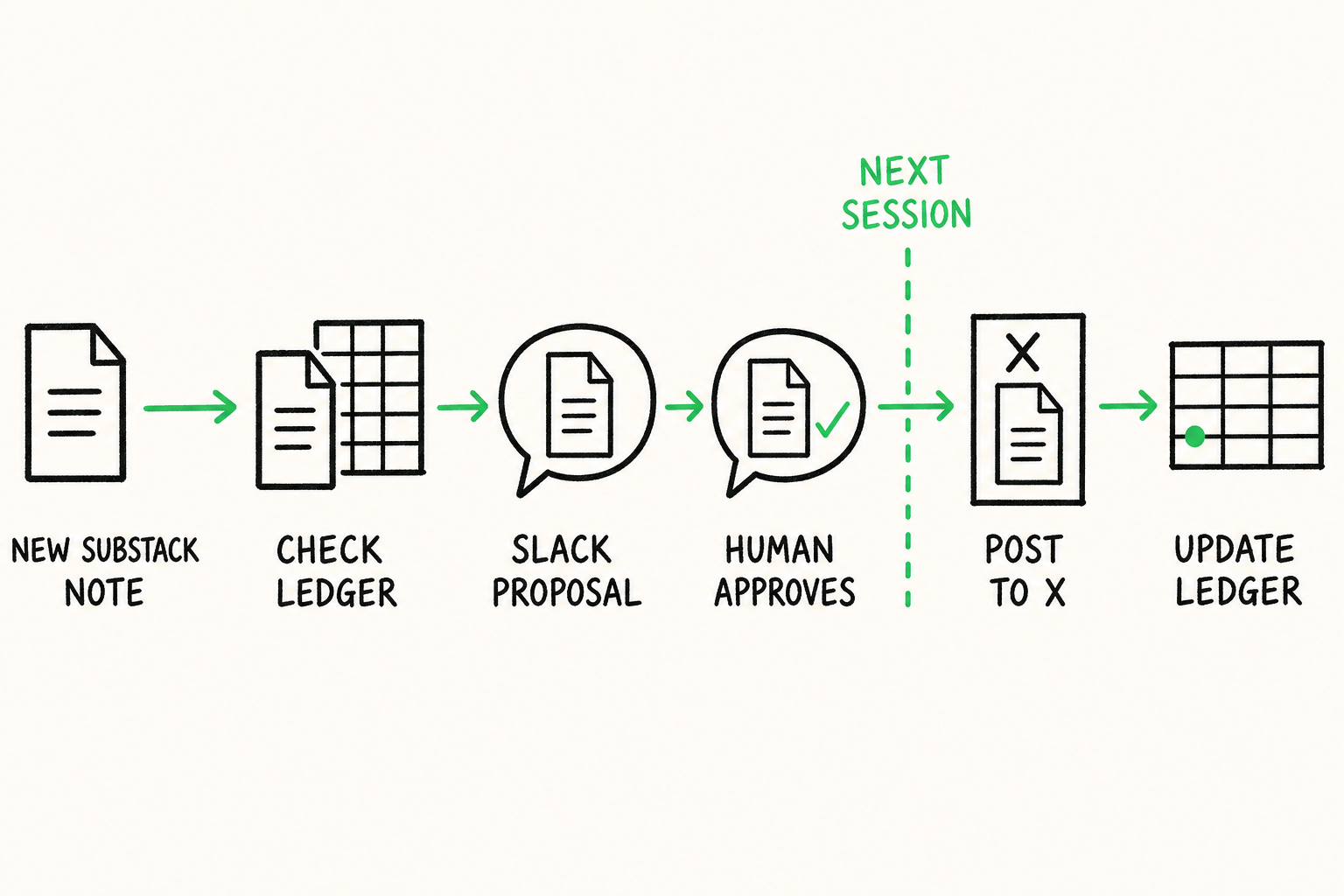
After the session is fired up with the proper provisioning, the agent first loads a ledger (a Google Sheet) that holds all of the Substack notes that are already posted on X, so the agent can cross-check to avoid posting duplicates. Now although Amol posts his notes/articles to Substack directly, we all want to manage the company’s X account from Slack (this is where the team interacts with the agent). So during each session, the agent will scrape Substack up to 4 hours prior (extra hour for overlap in case of late/slow runs) but may widen to 24 hours if a prior run failed. It’ll then cross-check with the ledger and all non-overlaps will then get sent into Slack for approval. Once someone approves, denies, or makes changes to the draft, the post will then go out during the subsequent session when the agent scrapes Slack for approvals.
So the flow looks like this:
- Every 3 hours, the broker claims a microVM from the fleet and starts a fresh agent, with proper provisions
- Scrape Slack for older proposals from the past 7 days
- If approved, connect to X and post a 1-1 version
- Reply in the original Slack thread with a link to the new post and append the post to the ledger with note ID, date, link
- Scrape Substack for new notes (4-24hr window)
- Filter notes down (drop duplicates from the ledger and anything confirmed live in Slack) and send proposals into Slack
- Tear down the session, no keys or memory are kept on the box, and the agent goes back to agentlandia, all without me needing to monitor or guide it

A small note I want to make here from previous trial and error. For the Slack proposals, anyone can either confirm, deny, or make an edit. If they decide to make an edit, then the agent will echo that edited post back to Slack and wait for another confirmation. This is because sometimes the agent can misinterpret the edit, so it needs another look. Also, the agent needs a strict “approve” or “deny” to mitigate any misinterpretation.
Articles
Now for syncing articles. To start, writing tweets and publishing articles are distinct actions in X’s own product model, and an article is just a much bigger swing in general than a tweet. So this agent leaves articles as draft only. Also posting articles is just very finicky for agents, hence the precaution.
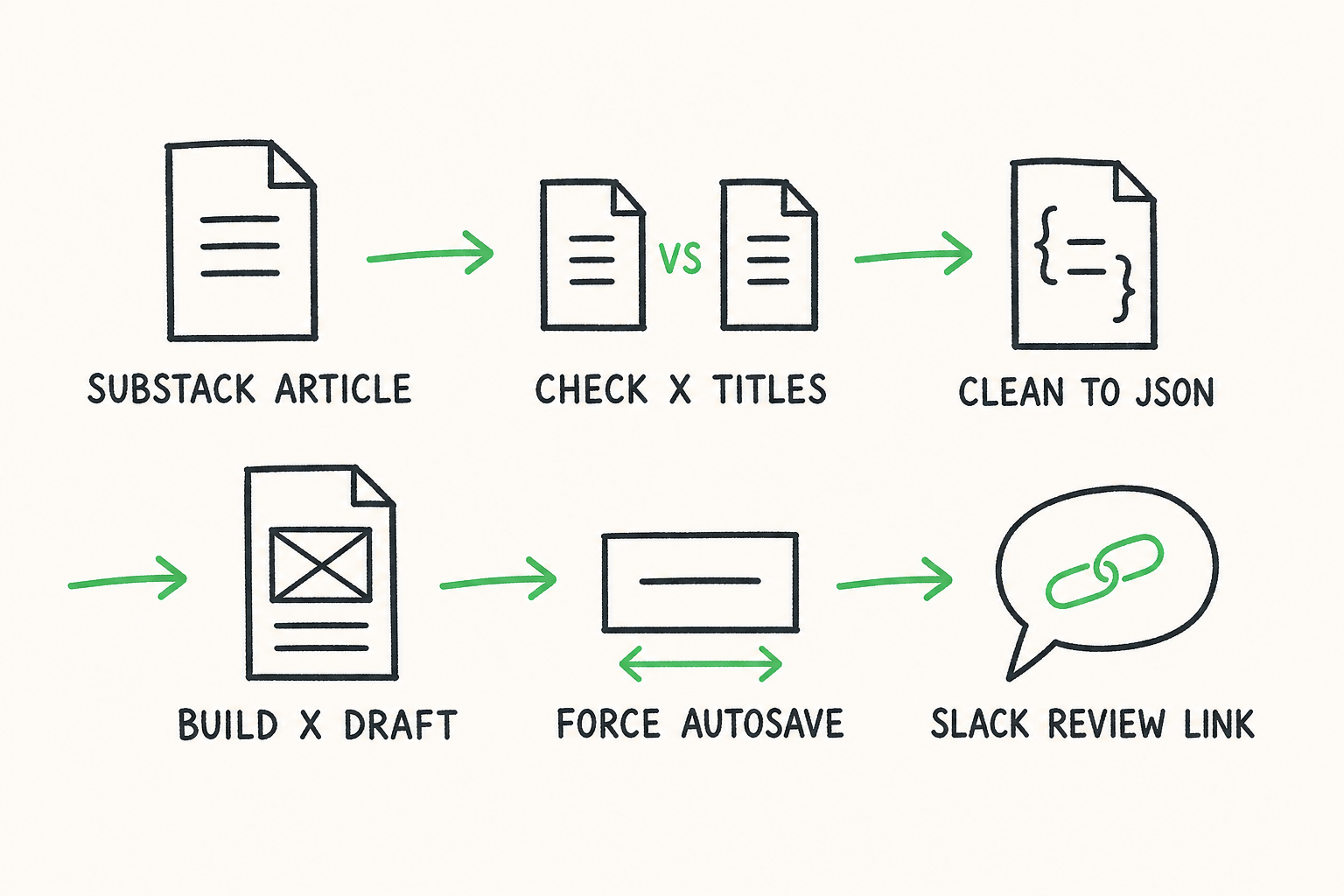
The process for posting articles is quite similar to posting notes, with some differences, though. One is that there is no ledger for checking duplicates for articles. Instead, the agent goes through all article drafts and published articles on X and dedups based on titles; the title can act as the article’s “key” (I’m not gonna post two articles w/ the same title). But for standard tweets, it’s much more tedious to dedup by scraping X, so we have the agent just import all tweets to the Google Sheet and give each tweet its own ID.
So after deduping, the agent exports a platform-neutral article by removing all Substack specific features (subscription widgets, forms, buttons, etc) while preserving more integral things like paragraphs, lists, headings, blockquotes. The output is then versioned JSON. The agent inserts this article into x.com/compose/articles using the following flow: Write → fill title → put HTML and plain text on the clipboard and paste → for each image, delete the marker and run X’s own insert media feature.
Now after all this, we have a little dilemma to save the article. The articles composer has no save button; the only way to save a draft is autosave, which fires when a change is made to the draft. The problem here is that most of what the Command-Line Interface (CLI) just did doesn’t look like typing because it’s just copy pasting and inserting images. So the agent will touch a field that X definitely watches like altering the title, and then revert it to the original. After the draft is saved, the agent posts it into Slack as “ready to review” with a link to the draft, and in two swift clicks I post the X article while sipping piña coladas on a beach in Central America (my desk in a co-working space).
Something to note here, highlighted code blocks don’t import to X’s article editor cleanly, but, thankfully, we don’t really write code anymore, so you won’t be seeing it in any articles.
And that’s it for posting articles and tweets! But, we’re still missing replies…
Replies
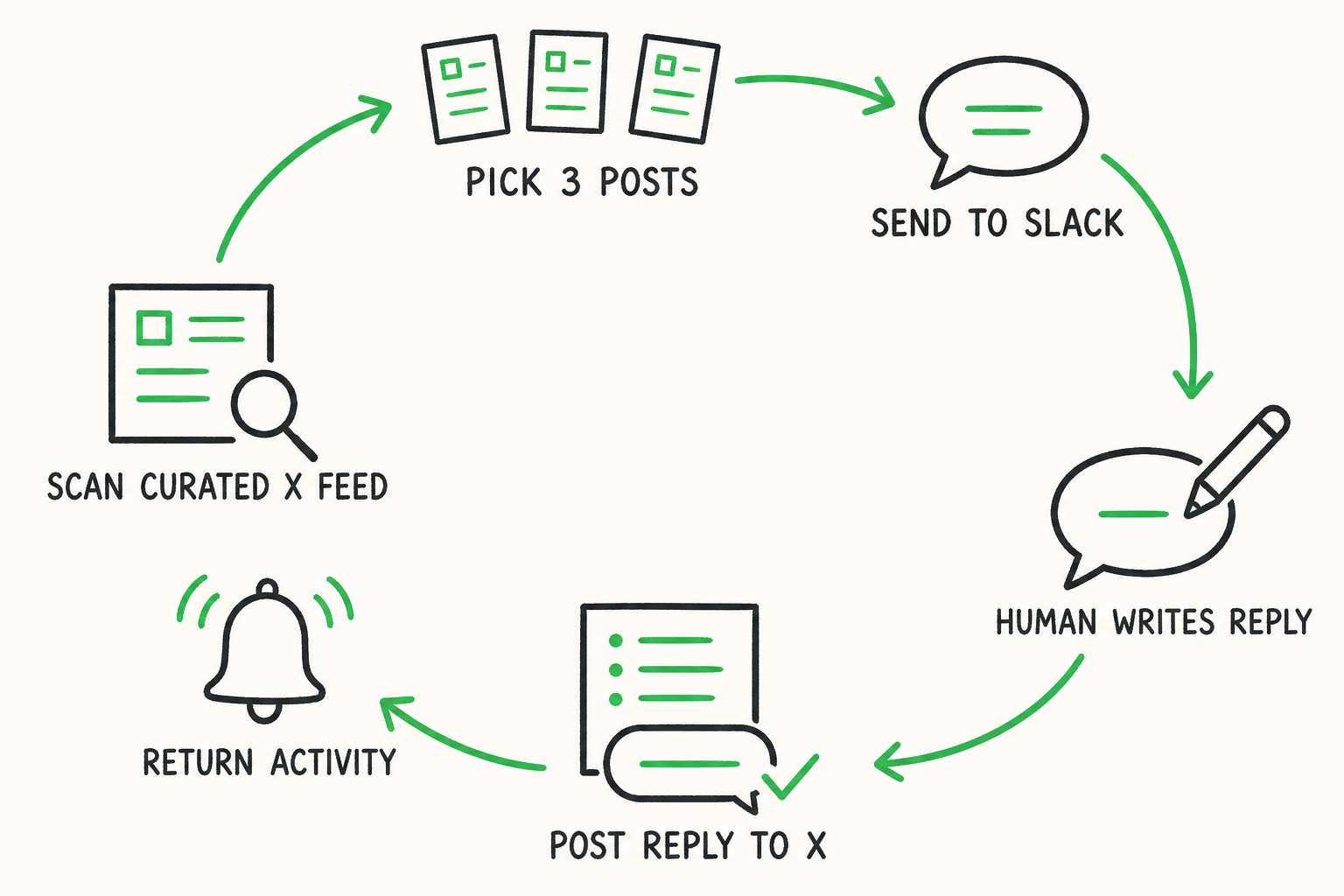
Being part of a community isn’t just about posting into the void. It’s also about finding interesting content and replying to others. We want to also be able to automatically surface interesting and relevant content and reply to it, all without having to manage a separate account. When we first started the account, Amol gave the agent a couple of people that he enjoys listening to, and the agent followed their X accounts and similar accounts, so the feed is already kind of curated. This is set up as a trigger, so every evening, the agents send a message in Slack with 3 posts that we’d find interesting. Someone from the team makes the comments in the same thread, the agent posts them to X, and the account … still somehow only has 20 followers (4 of them are bot accounts, 3 of them are Amol, Cliff and me). Thank you to our 13 followers, though! This trigger also gives us new activity (new followers, people mentioning the account, and replies), but, sadly, there’s not much new activity … (go follow @noriagent)
Now, with cloud agents, we can syndicate Substack to X all largely through Slack. Nobody has to watch an agent work or worry about it posting sensitive data to the accounts and we can sleep peacefully knowing that, as our eng lead Ritam once said: